Brother PE900 Review: Is This 5×7 Embroidery Machine Worth It?
Disclosure: As an Amazon Associate I earn from qualifying purchases. If you buy through links on this page, we may earn a small commission at no extra cost to you.
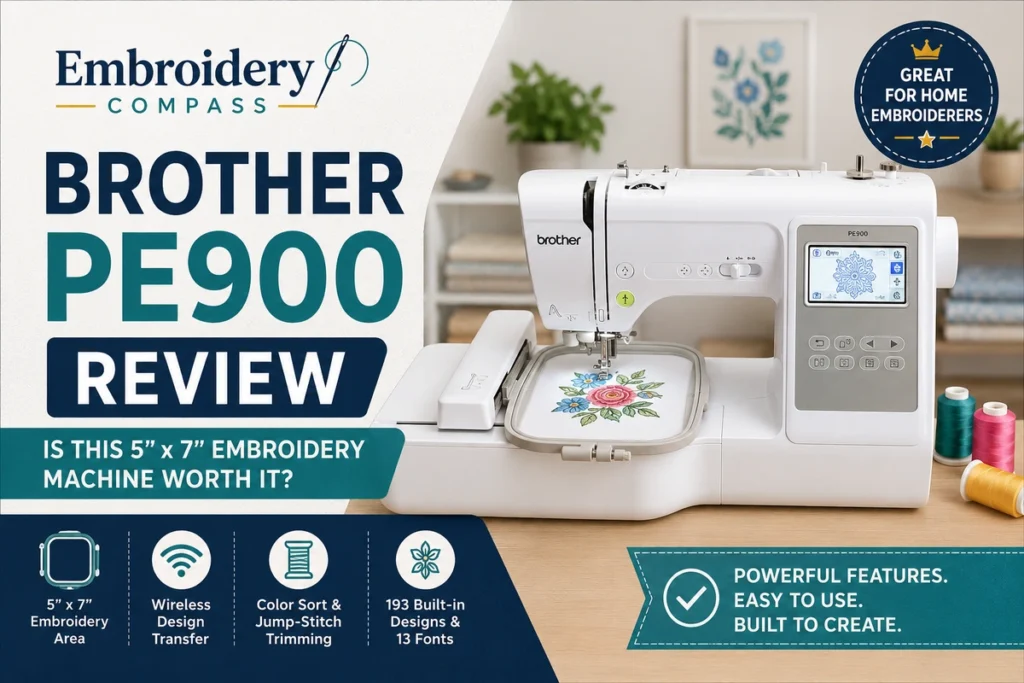
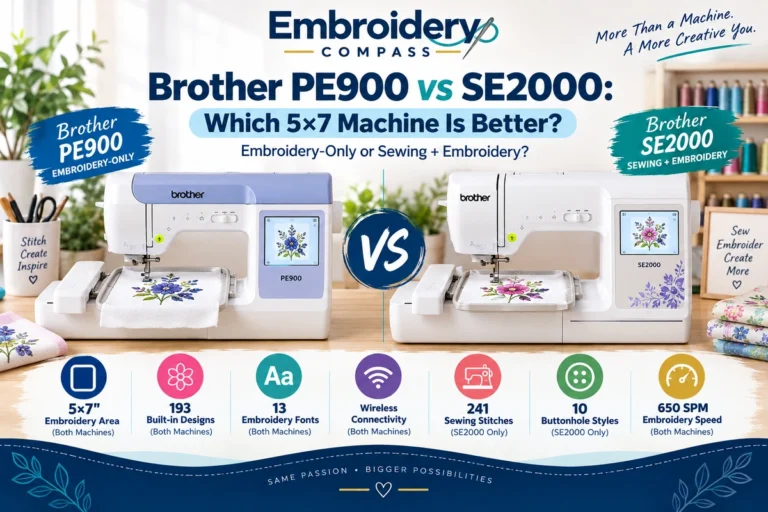
The Brother PE900 is an embroidery-only machine built around a 5 x 7-inch embroidery area, wireless design transfer and a collection of 193 built-in embroidery designs. It sits above Brother’s smaller 4 x 4-inch beginner models and is aimed at users who want more room for monograms, decorative designs, gifts, apparel and personalized projects without moving into a much larger multi-needle machine.
Its strongest advantages are the useful 5 x 7-inch field, wireless connectivity, Color Sort and automatic jump-stitch trimming. The biggest limitation is equally important: the PE900 is embroidery-only. It does not replace a regular sewing machine.
In this Brother PE900 review, we examine the specifications, workflow, design features, limitations and ideal users to help you decide whether this machine fits the kind of embroidery you actually want to make.
Brother PE900 Review: Quick Verdict
The Brother PE900 is a strong choice for home embroiderers who want a 5 x 7-inch embroidery-only machine with convenient wireless design transfer and useful automated features. It is particularly appealing to users who have outgrown a 4 x 4-inch field or already own a sewing machine and want a dedicated embroidery setup.
It is less suitable if you need sewing and embroidery in one machine, routinely work with designs larger than 5 x 7 inches, or are building a production-focused embroidery business where multi-needle operation would save significant time.
- Best for: Home embroidery, personalization, monograms, gifts and hobby users moving beyond a 4 x 4-inch machine
- Machine type: Embroidery-only
- Maximum embroidery area: 5 x 7 inches
- Built-in embroidery designs: 193
- Built-in embroidery fonts: 13
- Maximum embroidery speed: Up to 650 stitches per minute
- Connectivity: Wireless LAN and USB
- Not ideal for: Users who need regular sewing or substantially larger embroidery fields


Brother PE900 Specifications at a Glance
| Feature | Brother PE900 |
| Machine type | Embroidery-only |
| Maximum embroidery area | 5 x 7 inches |
| Built-in embroidery designs | 193 |
| Built-in embroidery fonts | 13 |
| Maximum embroidery speed | Up to 650 stitches per minute |
| Display | 3.7-inch color LCD touchscreen |
| Wireless LAN | Yes |
| USB design import | Yes |
| Design Database Transfer | Yes |
| Artspira compatibility | Yes |
| Color Sort | Yes |
| Jump-stitch trimming | Yes |
| Automatic thread cutter | Yes |
These specifications are based on Brother’s current PE900 product documentation. Features, included accessories and software support can change, so it is worth confirming the current package before purchasing.
Why the Brother PE900 Stands Out
1. The 5 x 7-Inch Embroidery Area Is a Meaningful Step Up
The 5 x 7-inch embroidery field is one of the most important reasons to consider the PE900. A 4 x 4-inch machine can be perfectly adequate for small names, patches and compact motifs, but the extra space of a 5 x 7 field opens up more possibilities without immediately moving into a premium large-field machine.
That extra room is useful for medium-size monograms, decorative motifs, personalized towels, children’s clothing, tote bags, quilt labels and many gift projects. It can also reduce how often you need to split or reposition designs that are slightly too large for a 4 x 4 hoop.
If embroidery is becoming more than an occasional hobby, the 5 x 7 field is one of the PE900’s most practical advantages.
2. Wireless Design Transfer Makes the Workflow Easier
The PE900 supports wireless LAN, allowing compatible embroidery files to be transferred from a computer through Brother’s Design Database Transfer software. USB import is also available, so you are not locked into a single transfer method.
Wireless transfer matters most once you begin using downloaded or custom embroidery files regularly. Instead of moving a USB drive back and forth for every design, compatible files can be managed and sent to the machine over the network.
The PE900 also works with Brother’s Artspira ecosystem. Artspira can be used to access designs and create certain custom patterns on a compatible mobile device before transferring them to the machine. Whether that becomes central to your workflow depends on how you source and create embroidery designs, but it gives the PE900 more flexibility than a machine limited to built-in patterns.
3. 193 Built-In Designs Give Beginners Plenty to Explore
Brother includes 193 embroidery designs and 13 embroidery lettering fonts. Built-in designs are not the main reason to buy a machine with USB and wireless transfer, because you can expand your library, but they are useful when learning the machine or creating a project without first sourcing an external file.
The lettering options are particularly relevant for personalization. Names, initials and short text are common embroidery projects, and having fonts available directly on the machine makes simple personalization easier to start.
4. Color Sort Can Reduce Unnecessary Thread Changes
Color Sort is one of the PE900 features that becomes more valuable as designs become more complex. For compatible multi-color designs, the machine can adjust the stitching order to reduce unnecessary color changes.
This does not turn a single-needle PE900 into a multi-needle production machine—you still change thread colors yourself—but it can make certain multi-color projects more efficient.
5. Automatic Jump-Stitch Trimming Improves Convenience
The PE900 includes jump-stitch trimming, which can automatically trim excess thread jumps within a color. That can reduce some of the manual cleanup associated with designs containing separated stitched areas.
For someone upgrading from a simpler embroidery machine, this is the type of feature that may not sound essential on a specification sheet but can make repeated projects less tedious.
How Easy Is the Brother PE900 to Use?
The PE900 combines beginner-friendly controls with enough embroidery-specific features to remain useful as your skills improve. Its 3.7-inch color LCD touchscreen lets you preview and edit designs on the machine, including functions such as resizing, rotating, repositioning, combining designs and editing lettering.
Brother also provides automatic needle threading, a quick-set bobbin system, upper and bobbin thread sensors, and an automatic thread cutter. These features do not eliminate the learning curve involved in stabilizer selection, hooping, thread tension, needle choice and fabric preparation, but they simplify the machine-side workflow.
If this will be your first embroidery machine, our guide to embroidery machines for beginners provides more context on what first-time users should prioritize before choosing a model.
What Can You Make With the Brother PE900?
The PE900 is best matched to projects that fit comfortably within its 5 x 7-inch maximum embroidery area. Typical uses can include:
- Monograms and names
- Personalized towels and linens
- Tote bags and fabric accessories
- Children’s clothing
- Decorative apparel designs
- Quilt labels and individual quilt blocks
- Gifts and home décor accents
- Small-batch personalized items
The important distinction is between what the machine can stitch and what fits within a single 5 x 7-inch field. Larger finished projects are possible when they use multiple separate placements or appropriately split designs, but buyers who routinely want large jacket backs, oversized decorative panels or other large single-field designs should consider a machine with a larger maximum embroidery area.
Is the Brother PE900 Good for Beginners?
Yes, the PE900 can make sense for a beginner who is confident that embroidery—not general sewing—is the priority. Its automatic features, touchscreen editing, built-in designs and multiple design-transfer options remove some friction from the learning process.
It may actually be a better long-term starting point than a 4 x 4-inch machine for someone who already expects to make medium-size designs. Buying a smaller machine first can save money initially, but the embroidery field is a physical limitation that software cannot remove.
On the other hand, a beginner who only wants occasional small embroidery may not need to pay for the larger field and extra features. Our best embroidery machines guide compares options for different experience levels and use cases.
Is the Brother PE900 Good for a Small Embroidery Business?
The PE900 can be useful for learning, testing product ideas and handling limited personalized orders, but it should not be confused with a production-focused commercial embroidery machine.
Because it is a single-needle machine, multi-color designs require manual thread changes. Its 5 x 7-inch field also limits the maximum size of a design that can be embroidered in one hooping. For a home-based seller producing names, monograms, small logos or personalized gifts in modest quantities, those limitations may be manageable. As order volume grows, however, a multi-needle machine can offer a more efficient workflow.
If you are comparing Brother models more broadly, see our best Brother embroidery machines guide for the differences between PE, SE and PR-style options.
Brother PE900 vs PE545: Is the PE900 Worth the Upgrade?
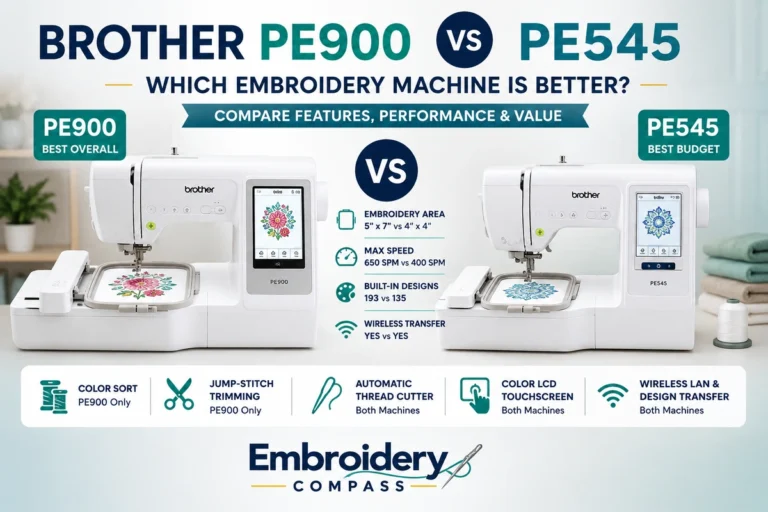
The biggest practical difference for many shoppers is embroidery area. The PE900 provides a 5 x 7-inch maximum field, while the PE545 is built around a smaller 4 x 4-inch field. The PE900 also offers a larger built-in design library and additional convenience features aimed at users who expect to embroider more frequently.
The PE545 remains attractive when budget and compact projects matter most. The PE900 makes more sense when you already know that 4 x 4 inches will feel restrictive or you value features such as Color Sort and jump-stitch trimming.
For a direct model-by-model breakdown, read our Brother PE900 vs PE545 comparison.
What Could Be Better?
It Does Not Sew
This is the most important limitation to understand before buying. The PE900 is an embroidery-only machine. If you want to construct garments, sew seams or perform everyday sewing tasks on the same machine, you need a sewing-and-embroidery combination model instead.
The 5 x 7-Inch Field Still Has Limits
A 5 x 7-inch field is much more flexible than 4 x 4 inches, but it is not a large commercial-style embroidery area. Buyers interested in oversized designs should decide on their typical design dimensions before choosing the machine.
It Is Still a Single-Needle Workflow
Color Sort can reduce some unnecessary color changes, but each new thread color still requires user involvement. That is normal for this class of home embroidery machine, but it matters if your goal is high-volume production.
Price Should Be Compared With Your Actual Needs
The PE900’s value depends on whether you will use its larger field, wireless workflow and automated embroidery features. Someone making only occasional 4 x 4-inch designs may be better served by a less expensive machine, while a frequent embroiderer may find the PE900’s extra capability worth paying for. Because retail pricing changes, compare the current price rather than relying on an old quoted figure.
Brother PE900 Pros and Cons
Pros
- Useful 5 x 7-inch embroidery area
- 193 built-in embroidery designs
- 13 built-in embroidery fonts
- Wireless LAN plus USB import
- Design Database Transfer support
- Artspira compatibility
- Color Sort for more efficient color sequencing
- Automatic jump-stitch trimming
- Up to 650 stitches per minute
- On-screen design and lettering editing
Cons
- Embroidery-only; no regular sewing functions
- 5 x 7-inch field may be too small for oversized designs
- Single needle requires manual thread changes for multi-color work
- May be more machine than occasional 4 x 4-inch users need
Who Should Buy the Brother PE900?
The Brother PE900 is particularly well suited to:
- Beginners who want room to grow: The 5 x 7 field provides more flexibility than entry-level 4 x 4 machines.
- Existing sewing-machine owners: If you already have a sewing machine, a dedicated embroidery machine can let you keep the two workflows separate.
- Home embroiderers: The combination of built-in designs, wireless transfer and automatic features works well for regular hobby use.
- Personalization-focused makers: Names, monograms, gifts and medium-size decorative designs fit the PE900’s strengths.
- Small-scale sellers: It can be a practical starting or supplementary machine when order volume is modest and products fit the 5 x 7 field.
Who Should Skip the Brother PE900?
- Anyone needing sewing and embroidery in one machine: The PE900 does embroidery only.
- Users focused on oversized designs: A larger embroidery field will be more appropriate.
- High-volume businesses: Frequent multi-color production can justify moving to a multi-needle platform.
- Very occasional embroiderers: A simpler machine may offer better value if your projects stay small.
Frequently Asked Questions
Is the Brother PE900 embroidery-only?
Yes. The Brother PE900 is a dedicated embroidery machine and does not provide normal sewing functions.
What is the largest embroidery size on the Brother PE900?
The maximum embroidery area is 5 x 7 inches (approximately 130 x 180 mm).
How many designs does the Brother PE900 have?
Brother lists 193 built-in embroidery designs and 13 built-in embroidery lettering fonts for the PE900.
Can you upload your own designs to the Brother PE900?
Yes. The PE900 supports design transfer through wireless LAN using Brother’s compatible transfer software and also provides a USB port for importing compatible embroidery files.
Does the Brother PE900 work with Artspira?
Yes. Brother lists the PE900 as compatible with its Artspira app ecosystem for accessing and transferring supported embroidery content.
Does the Brother PE900 cut jump stitches?
Yes. Brother includes a jump-stitch trimming function that can automatically trim excess thread jumps within a color.
Is the Brother PE900 better than the PE545?
The PE900 is the more capable choice when you need a 5 x 7-inch embroidery area and its additional workflow features. The PE545 can still be the better value for buyers who primarily make small 4 x 4-inch projects and want a lower-cost entry point.
Final Verdict: Is the Brother PE900 Worth It?
For the right user, yes. The Brother PE900 occupies a useful middle ground between compact entry-level embroidery machines and significantly larger or more production-oriented systems. Its 5 x 7-inch embroidery area gives home users meaningful project flexibility, while wireless transfer, Color Sort and jump-stitch trimming improve the everyday embroidery workflow.
The deciding question is not simply whether the PE900 has good features. It is whether those features match your projects. If you want dedicated embroidery, expect to use designs larger than 4 x 4 inches and value convenient design transfer, the PE900 is a compelling Brother option. If you need regular sewing too, or routinely need a field larger than 5 x 7 inches, another machine category will fit better.
How we evaluate: Embroidery Compass develops its recommendations through manufacturer documentation, specifications, feature comparisons and practical buying research. We do not claim hands-on testing unless a machine has actually been personally tested.