Brother SE2000 vs NQ3550W: Which Sewing & Embroidery Machine Is Better?
Disclosure: As an Amazon Associate I earn from qualifying purchases. If you buy through links on this page, we may earn a small commission at no extra cost to you.
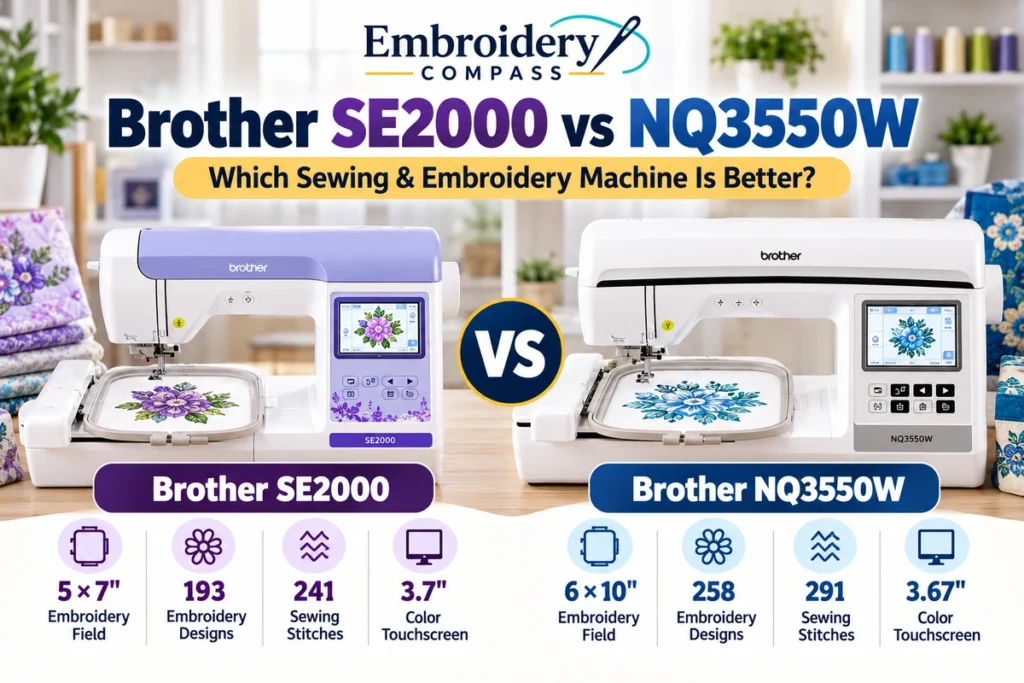
If you are comparing the Brother SE2000 vs NQ3550W, the biggest question is not whether either machine can sew and embroider. Both are single-needle Brother combination machines with sewing, embroidery, wireless design transfer, color touchscreens and access to Brother’s Artspira ecosystem.
The more important difference is capacity. The SE2000 gives you a 5×7-inch embroidery field in a relatively compact platform, while the NQ3550W moves up to a 6×10-inch embroidery field, a larger workspace and a broader collection of built-in sewing and embroidery designs.
That makes this comparison particularly useful for someone deciding whether a 5×7 combo machine is enough or whether it makes sense to move directly to Brother’s larger 6×10 class.
Brother SE2000 vs NQ3550W: Quick Comparison
| Feature | Brother SE2000 | Brother NQ3550W |
|---|---|---|
| Machine type | Sewing + embroidery | Sewing + embroidery + quilting |
| Maximum embroidery area | 5×7 inches | 6×10 inches |
| Built-in embroidery designs | 193 | 258 |
| Embroidery fonts | 13 | 13 |
| Built-in sewing stitches | 241 | 291 |
| One-step buttonhole styles | 10 | 10 |
| Sewing lettering fonts | 5 | 5 |
| Color touchscreen | 3.7 inches | 3.67 inches |
| Wireless connectivity | Yes | Yes |
| Design Database Transfer | Yes | Yes |
| Artspira compatibility | Yes | Yes |
| My Custom Stitch | Yes | Yes |
| Needle-to-arm/workspace | 7.4 inches needle to arm | 8.3 × 4.1-inch workspace |
| Included maximum embroidery frame | 5×7 inches | 6×10 inches |
Quick takeaway: the SE2000 covers the core sewing-and-embroidery functions most home users need, while the NQ3550W primarily earns its step-up position through its larger embroidery field, larger workspace and expanded built-in design and stitch libraries.
Brother SE2000 Overview
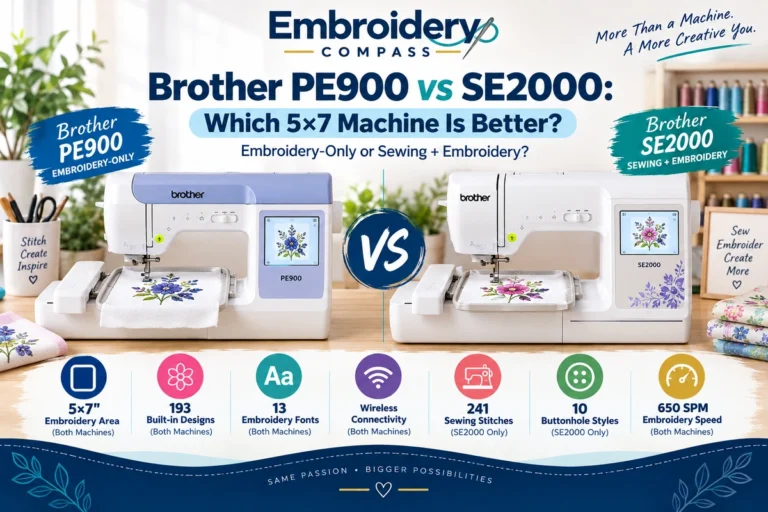
The Brother SE2000 is a combination sewing and embroidery machine built around a 5×7-inch maximum embroidery field. That size is a meaningful step beyond Brother’s smaller 4×4 machines without requiring the space of a larger embroidery platform.
Brother equips the SE2000 with 193 built-in embroidery designs, 13 embroidery lettering fonts and 241 built-in sewing stitches. It also includes 10 styles of one-step auto-size buttonholes and five sewing lettering fonts.
The machine has a 3.7-inch color LCD touchscreen for selecting, combining and editing embroidery designs. Wireless LAN allows compatible embroidery files to be transferred from a computer through Brother’s Design Database Transfer software, while Artspira adds mobile design creation and transfer options.
Brother rates the SE2000 for embroidery speeds up to 650 stitches per minute and sewing speeds up to 850 stitches per minute. Its needle-to-arm distance is 7.4 inches.


Where the SE2000 Stands Out
- 5×7-inch embroidery field handles many common home embroidery projects.
- Combines sewing and embroidery in one machine.
- 193 built-in embroidery designs.
- 241 built-in sewing stitches.
- 13 embroidery fonts and five sewing lettering fonts.
- Wireless design transfer.
- Artspira compatibility.
- Automatic needle threading and thread cutting.
- Color Sort and Jump Stitch Trimming for embroidery workflows.
Brother NQ3550W Overview
The Brother NQ3550W occupies a different position in the lineup. It is also a single-needle sewing and embroidery combination machine, but its 6×10-inch maximum embroidery area gives you substantially more room for larger designs.
It includes 258 built-in embroidery designs, 140 frame-pattern combinations and 13 embroidery lettering fonts. On the sewing side, Brother provides 291 built-in stitches, 10 styles of one-step auto-size buttonholes and five sewing lettering fonts.
The NQ3550W uses a 3.67-inch color LCD touchscreen. On-screen controls support functions such as letter editing, resizing, rotating, repositioning, drag-and-drop placement and combining designs.
It also supports wireless Design Database Transfer and Brother’s Artspira app. Its 8.3 × 4.1-inch needle-to-arm workspace provides additional room when working with larger sewing and quilting projects.
Amazon availability note: We did not find a current Amazon listing for the NQ3550W when this comparison was prepared. Because retailer availability can change, we have not substituted a different Brother model or unrelated Amazon listing.
5×7 vs 6×10 Embroidery Area: The Biggest Difference
The embroidery field is the most important practical difference between the SE2000 and NQ3550W.
The SE2000’s 5×7 field provides a maximum rectangular area of about 35 square inches, while a 6×10 field represents about 60 square inches. Based simply on rectangular area, that gives the NQ3550W roughly 71% more maximum embroidery-field area.
That does not mean every project uses all of that space. It does mean that a design exceeding the SE2000’s 5×7 boundary may fit within the NQ3550W’s larger 6×10 field without splitting the design or repositioning fabric.
What Fits a 5×7 Machine Well?
A 5×7 field can handle many everyday embroidery projects, including names, monograms, small decorative motifs, children’s clothing, patches, towels, bags and many personalized gifts. For users whose designs normally remain within this size, moving to 6×10 may not be necessary.
When 6×10 Becomes Useful
The NQ3550W’s 6×10 field becomes more useful when you regularly work with larger decorative designs, longer lettering layouts, bigger garment designs, home décor or embroidery compositions that would exceed a 5×7 hoop.
This is the strongest reason to consider the NQ3550W over the SE2000. The upgrade is less about basic embroidery capability and more about having additional physical room for larger designs.
Built-In Embroidery Designs: 193 vs 258
The NQ3550W also provides a larger built-in embroidery library.
The SE2000 includes 193 built-in embroidery designs, while the NQ3550W includes 258. That is 65 additional built-in designs on the NQ3550W.
Both machines include 13 embroidery lettering fonts, so the difference is primarily in the number of decorative designs rather than lettering options.
The NQ3550W additionally provides 140 frame-pattern combinations. These can be useful when building decorative borders and framed embroidery directly from the machine.
However, built-in design count should not be the deciding factor by itself. Both machines support transferring additional compatible embroidery designs, which makes the maximum embroidery field more consequential over the long term.
Sewing Features: 241 vs 291 Stitches
Because both machines are true combination models, their sewing capabilities matter just as much as embroidery for many buyers.
The SE2000 offers 241 built-in sewing stitches. The NQ3550W increases that to 291 stitches, giving it 50 additional built-in stitch selections.
Both provide 10 styles of one-step auto-size buttonholes and five sewing lettering fonts. Both also support Brother’s My Custom Stitch feature, which lets you create and save custom sewing stitches.
For ordinary garment construction, alterations and general sewing, 241 stitches already represent a broad selection. The NQ3550W’s larger library becomes more relevant to users who enjoy decorative sewing, quilting and experimenting with a wider range of stitch patterns.
Workspace and Quilting
The physical workspace is another reason the NQ3550W belongs in a higher-capacity category.
Brother specifies 7.4 inches from the needle to the arm on the SE2000. The NQ3550W provides an 8.3 × 4.1-inch needle-to-arm workspace.
Extra room can make fabric management more comfortable when sewing larger garments, home décor pieces and quilt sections. Brother specifically positions the NQ3550W as a sewing, embroidery and quilting machine, which reflects this broader project focus.
If embroidery is your primary reason for upgrading, however, the 6×10 hoop capacity remains the more significant distinction.
Touchscreen and On-Screen Editing
There is surprisingly little difference in screen size.
The SE2000 uses a 3.7-inch color LCD touchscreen, while Brother specifies a 3.67-inch color LCD touchscreen for the NQ3550W.
The NQ3550W supports on-screen functions including letter editing, enhanced zoom, resizing, rotating, repositioning, drag-and-drop placement and combining designs.
The SE2000 also provides touchscreen design editing, including lettering and design-combination controls. Therefore, buyers should not view the NQ3550W primarily as a screen-size upgrade. Its larger embroidery and sewing workspace is much more important.
Wireless Design Transfer and Artspira
Connectivity is one area where these machines are closely matched.
Both support wireless connectivity and Brother’s Design Database Transfer software, allowing compatible embroidery files to be sent from a computer to the machine over a wireless network.
Both are also compatible with Brother’s Artspira app, giving users another way to access, create and transfer embroidery content.
Because both models offer these features, wireless connectivity alone is not a strong reason to choose one over the other.
Which Is Easier for Home Use?
For a home user who wants both sewing and embroidery but expects most embroidery projects to stay within 5×7 inches, the SE2000 covers a broad range of needs without requiring the larger embroidery platform of the NQ3550W.
It still provides wireless transfer, touchscreen editing, automatic needle threading, automatic thread cutting and a substantial collection of sewing and embroidery content.
The NQ3550W makes more sense when the extra working area will actually be used. If you already know that 5×7 designs feel restrictive, choosing the larger field from the beginning can prevent embroidery size from becoming the first limitation you encounter.
Which Is Better for Larger Embroidery Projects?
The NQ3550W has the clear specification advantage for larger embroidery because of its 6×10 maximum field.
For a design measuring, for example, 5.5 inches across one dimension, the SE2000’s 5-inch hoop dimension may become a constraint even if the other dimension remains below seven inches. A 6×10 field provides additional flexibility for such designs.
This matters for users who want larger garment graphics, decorative home projects or more spacious design compositions without dividing them into multiple hoopings.
Which Is Better for Sewing and Quilting?
Both machines have extensive sewing functionality, so the SE2000 should not be treated as an embroidery machine with only basic sewing added.
Its 241 built-in stitches, buttonholes, lettering fonts, knee lifter and My Custom Stitch feature provide considerable sewing flexibility.
The NQ3550W nevertheless offers more room and 291 built-in stitches, and Brother explicitly positions it for sewing, embroidery and quilting. Users who expect quilting and larger sewing projects to form a significant part of their workload may therefore benefit more from its expanded workspace.
Brother SE2000 Pros and Cons
Pros
- 5×7 embroidery field is suitable for many home projects.
- 193 built-in embroidery designs.
- 241 sewing stitches.
- 13 embroidery fonts.
- Wireless design transfer.
- Artspira support.
- 3.7-inch color touchscreen.
- Automatic needle threading and thread cutting.
- Combines serious sewing and embroidery capability in one machine.
Cons
- 5×7 maximum embroidery field can restrict larger designs.
- Smaller workspace than the NQ3550W.
- Fewer built-in embroidery designs and sewing stitches than the NQ3550W.
Brother NQ3550W Pros and Cons
Pros
- Larger 6×10 embroidery area.
- 258 built-in embroidery designs.
- 140 frame-pattern combinations.
- 291 built-in sewing stitches.
- 13 embroidery fonts.
- Larger needle-to-arm workspace.
- Wireless Design Database Transfer.
- Artspira compatibility.
- Strong fit for sewing, embroidery and quilting projects.
Cons
- Larger capacity may be unnecessary if you rarely exceed 5×7 embroidery.
- The touchscreen is not meaningfully larger than the SE2000’s display.
- Amazon availability can be limited, depending on when and where you shop.
Who Should Choose the Brother SE2000?
The SE2000 is worth considering if you want a capable Brother sewing-and-embroidery combination machine and 5×7 inches covers the majority of the embroidery designs you expect to make.
It is particularly well suited to users who want one machine for garment sewing, personalization, monograms, gifts, décor and medium-size embroidery without specifically needing a 6×10 field.
If you are still comparing Brother models more broadly, see our Best Brother Embroidery Machines guide.
Who Should Choose the Brother NQ3550W?
The NQ3550W is better suited to someone whose project requirements already justify moving beyond 5×7 embroidery.
Its 6×10 field is the strongest reason to step up, followed by its larger sewing workspace, 258 embroidery designs and 291 sewing stitches.
It can also be the more appropriate platform for users who divide their time among sewing, embroidery and quilting and want additional physical workspace for larger projects.
For additional combination-machine options, see our Best Sewing and Embroidery Machines comparison.
Brother SE2000 vs NQ3550W: Frequently Asked Questions
What is the main difference between the Brother SE2000 and NQ3550W?
The main difference is embroidery capacity. The SE2000 has a 5×7-inch maximum embroidery area, while the NQ3550W increases this to 6×10 inches. The NQ3550W also has a larger workspace and more built-in sewing and embroidery designs.
Is the NQ3550W an embroidery-only machine?
No. The NQ3550W combines sewing and embroidery functions, and Brother also positions it for quilting. It is not an embroidery-only model.
Is the Brother SE2000 embroidery-only?
No. The SE2000 is also a combination machine. It includes 241 built-in sewing stitches in addition to its 193 embroidery designs and 5×7 embroidery capability.
Does the NQ3550W have a larger embroidery hoop than the SE2000?
Yes. The NQ3550W supports a maximum 6×10-inch embroidery area, compared with 5×7 inches on the SE2000.
Do both machines support wireless embroidery design transfer?
Yes. Both support wireless connectivity and Brother’s Design Database Transfer software for transferring compatible embroidery designs from a computer without relying solely on USB transfer.
Do the SE2000 and NQ3550W work with Artspira?
Yes. Brother lists Artspira compatibility for both machines.
Is 5×7 embroidery enough?
For many monograms, names, patches, towels, children’s clothing, bags and medium-size decorative designs, 5×7 can provide enough room. A 6×10 field becomes more valuable when your designs regularly exceed the 5×7 boundary or when you want more flexibility for larger compositions.
Final Comparison: SE2000 or NQ3550W?
The Brother SE2000 vs NQ3550W decision comes down primarily to how much embroidery and sewing space you actually need.
The SE2000 provides a strong 5×7 platform with 193 embroidery designs, 241 sewing stitches, wireless connectivity, Artspira support and a color touchscreen. For home users whose embroidery normally fits inside 5×7, those specifications cover a wide range of sewing and personalization projects.
The NQ3550W moves into a larger project class with its 6×10 embroidery field, 258 embroidery designs, 291 sewing stitches and larger workspace. Those differences matter most when larger embroidery, quilting and roomier fabric handling are genuine requirements rather than occasional possibilities.
Instead of choosing based only on the longer feature list, consider the largest embroidery designs and sewing projects you realistically expect to make. If 5×7 covers them, the SE2000 already provides substantial capability. If 5×7 would regularly limit your designs, the NQ3550W’s 6×10 platform addresses that limitation directly.
How We Compared These Machines
Embroidery Compass develops its recommendations through manufacturer documentation, specifications, feature comparisons and practical buying research. We do not claim hands-on testing unless a machine has actually been personally tested.
For this comparison, we evaluated the machines using their embroidery areas, built-in designs, sewing functions, workspace, display and editing features, wireless connectivity, design-transfer options and current product availability. Specifications were checked against Brother’s product documentation at the time this article was prepared.