Brother SE700 Review: Is It a Good First Sewing & Embroidery Machine?
Disclosure: As an Amazon Associate I earn from qualifying purchases. If you buy through links on this page, we may earn a small commission at no extra cost to you.
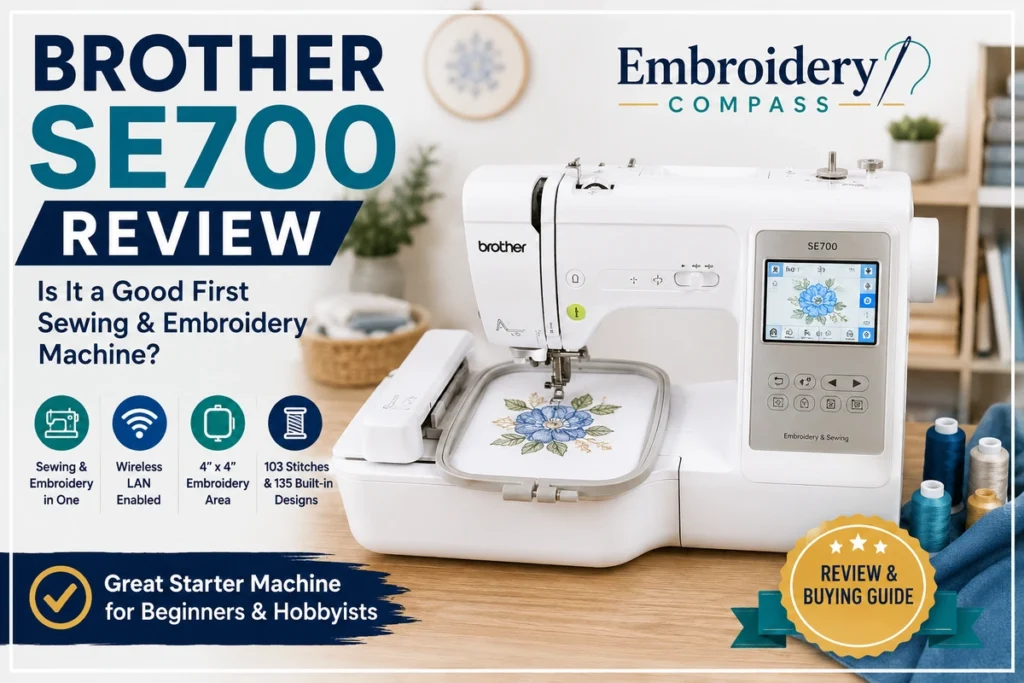
The Brother SE700 is a combination sewing and embroidery machine designed for beginners and home users who want one machine for both everyday sewing and smaller embroidery projects. It combines 103 built-in sewing stitches with 135 embroidery designs, wireless design transfer, Artspira compatibility, automatic thread cutting and a color LCD touchscreen.
The biggest reason to consider the SE700 is convenience. Instead of buying separate sewing and embroidery machines, you can learn both workflows on one compact platform. The main limitation is just as important: its maximum native embroidery area is 4 x 4 inches.
That field size works well for names, monograms, small patches, children’s clothing and compact decorative designs, but it can feel restrictive if you already know you want larger shirt designs or more ambitious embroidery.
In this Brother SE700 review, we look at its sewing capability, embroidery features, wireless workflow, beginner friendliness, recurring customer feedback, limitations and the type of buyer it suits best.
Brother SE700 Review: Quick Verdict
The Brother SE700 is a practical first sewing and embroidery machine for beginners who want one entry-level platform for learning both crafts. Its wireless connectivity, touchscreen controls, built-in designs, automatic features and 103 sewing stitches give home users plenty of room to learn without making the machine unnecessarily complicated.
The deciding factor is the 4 x 4-inch embroidery field. If most of your planned projects involve small personalization and compact designs, that may be enough. If embroidery is already your main interest and you expect to work with larger designs, starting with a native 5 x 7-inch machine can make more sense than upgrading shortly after purchase.
- Best for: Beginners, hobbyists and home users who want sewing and embroidery in one machine
- Machine type: Sewing and embroidery combination machine
- Maximum embroidery area: 4 x 4 inches
- Built-in embroidery designs: 135
- Embroidery fonts: 10
- Built-in sewing stitches: 103
- Maximum sewing speed: Up to 710 stitches per minute
- Connectivity: Wireless LAN and USB
- Not ideal for: Larger embroidery projects or higher-volume production


Brother SE700 Specifications at a Glance
We checked the important specifications against Brother’s current SE700 product documentation and operating information rather than relying only on third-party product listings.
| Feature | Brother SE700 |
| Machine type | Sewing and embroidery combination |
| Maximum embroidery area | 4 x 4 inches (100 x 100 mm) |
| Built-in embroidery designs | 135 |
| Built-in embroidery fonts | 10 |
| Built-in sewing stitches | 103 |
| One-step buttonhole styles | 10 |
| Maximum sewing speed | Up to 710 stitches per minute |
| Maximum embroidery speed | Up to 400 stitches per minute |
| Display | 3.2 x 1.8-inch color LCD display |
| Wireless LAN | Yes |
| USB design import | Yes |
| Design Database Transfer | Yes |
| Artspira compatibility | Yes |
| Automatic thread cutter | Yes |
| Advanced needle threading | Yes |
| Included presser feet | 8 |
| Included embroidery frame | 4 x 4 inches |
| Approximate machine weight | 15.06 lb |
| Warranty | 1/2/25 Year Limited Warranty |
These specifications are based on Brother’s current SE700 documentation. Included accessories, software support and product packages can change, so it is worth checking the current listing before purchasing.
Why the Brother SE700 Stands Out
1. Sewing and Embroidery in One Machine
The SE700’s biggest advantage is that it combines two functions in one machine. You can use it for everyday sewing tasks such as seams, repairs, hems and decorative stitching, then attach the embroidery unit when you want to personalize a project.
For a beginner, this can be more practical than buying two separate machines immediately. It also makes the SE700 appealing to users with limited sewing or craft-room space.
If you are still comparing combination models, our best sewing and embroidery machines guide covers other options for different project sizes and experience levels.
2. The 4 x 4-Inch Field Covers Many Beginner Projects
The SE700 provides a 4 x 4-inch embroidery field. This is a common starting size for home embroidery and works well for small names, monograms, patches, children’s clothing, small motifs, quilt labels and compact gift projects.
The limitation is that 4 x 4 inches is the machine’s maximum native embroidery area. If you already know you want larger motifs, medium-size shirt designs or more ambitious decorative work, a 5 x 7-inch or larger machine will provide more flexibility.
Can a Larger Hoop Make the SE700 a 5 x 7 Machine?
No. A larger or repositionable accessory hoop does not change the SE700’s native 4 x 4-inch maximum embroidery area.
Certain projects can be divided and stitched using more than one position, but the machine still works within its supported embroidery area at each position. A larger physical hoop should not be confused with a larger native embroidery field.
If you already know you want true 5 x 7-inch designs in a single embroidery field, it is better to choose a machine designed for that size. Our Brother PE900 review covers one larger-field Brother option.
3. Wireless Design Transfer Adds Convenience
The SE700 supports wireless LAN, allowing compatible embroidery files to be transferred from a computer using Brother’s Design Database Transfer software. It also supports USB design import, giving users another way to move compatible designs to the machine.
For beginners who plan to download designs rather than rely only on the built-in library, wireless transfer can make the workflow more convenient.
However, wireless connectivity should not outweigh embroidery-field size in your buying decision. A wireless 4 x 4 machine is still limited to a 4 x 4 native embroidery area.
4. Artspira Expands the Design Workflow
The SE700 is compatible with Brother’s Artspira app. Artspira provides access to compatible embroidery content and lets users create certain custom patterns on a mobile device before transferring supported designs to the machine.
This gives beginners another way to experiment with embroidery without immediately purchasing advanced desktop digitizing software.
5. 103 Sewing Stitches Add Everyday Versatility
The SE700 includes 103 built-in sewing stitches and 10 styles of one-step buttonholes. That provides a useful mix of utility and decorative stitches for everyday home sewing.
This matters because the SE700 is not simply an embroidery machine with a token sewing function. A buyer who genuinely wants to learn both crafts can continue using the sewing side for repairs, garment projects, crafts and other routine jobs even when embroidery is not required.
How Easy Is the Brother SE700 to Use?
The SE700 is positioned well for beginners because many routine operations are assisted by automatic or guided features. The color LCD display allows users to preview embroidery designs and make basic on-screen adjustments before stitching.
Brother also includes advanced needle threading, an automatic thread cutter and a quick-set bobbin system. These features reduce some of the repetitive setup involved in sewing and embroidery.
There is still a learning curve. Successful embroidery depends on correct stabilizer use, hooping, needle choice, thread selection, bobbin setup and fabric preparation. The machine can simplify parts of the workflow, but it cannot replace those fundamentals.
If this will be your first embroidery-capable machine, our best embroidery machines for beginners guide explains the main features new users should understand before choosing a model.
What Customers Commonly Say About the Brother SE700
Rather than assigning our own star score to the SE700, we look at recurring themes in customer and owner feedback and keep those experiences separate from manufacturer specifications.
Across current retailer reviews, many owners describe the SE700 as approachable for beginners and appreciate having both sewing and embroidery in one machine. Automatic needle threading, thread cutting and wireless connectivity are also mentioned positively.
At the same time, owner feedback makes it clear that being beginner-friendly does not mean there is no learning curve. New users still need practice with hooping, stabilizers, embroidery files and thread setup, and some buyers eventually wish they had started with a larger embroidery field.
| What Owners Commonly Like | Limitations Owners Commonly Mention |
| Approachable as a first sewing and embroidery machine | Embroidery techniques still require practice |
| Convenience of having sewing and embroidery in one machine | The 4 x 4-inch field can feel restrictive as projects grow |
| Automatic needle threading and thread cutting | Some beginners need time to learn hooping and stabilizer selection |
| Wireless design-transfer capability | Users focused mainly on embroidery may want a larger machine sooner |
| Useful built-in sewing and embroidery options | Single-needle embroidery requires manual thread changes for multicolor designs |
These are recurring owner-feedback patterns rather than guarantees about every user’s experience. Results can also depend on thread, needles, stabilizer, hooping, fabric preparation and the quality of the embroidery design.
What Can You Sew With the Brother SE700?
The SE700 can handle a broad range of everyday home sewing projects. Typical uses include:
- Garment construction and simple clothing projects
- Hemming and alterations
- Home décor projects
- Craft sewing
- Quilting-related sewing tasks
- Decorative stitching
- Buttonholes
- Repairs and general-purpose sewing
The exact result depends on fabric, needle, thread and project thickness, but the SE700’s stitch selection gives beginners enough range to learn and complete many common sewing jobs without immediately needing a second machine.
What Can You Embroider With the Brother SE700?
The 4 x 4-inch field is best suited to compact embroidery projects such as:
- Names and initials
- Monograms
- Small patches
- Baby and children’s clothing
- Small shirt or pocket designs
- Quilt labels
- Small decorative motifs
- Personalized gifts
- Towels and small linen accents
If these are the types of projects you expect to make, the SE700’s embroidery area can be sufficient. If you are already interested in larger designs, the field size is the main reason to compare it with Brother’s 5 x 7-inch options before buying.
Brother SE700 Sewing Performance
On the sewing side, the SE700 offers enough stitch variety for general home use and beginner projects. Its 103 built-in stitches include utility and decorative options, while the 10 one-step buttonhole styles provide additional flexibility for garment and craft work.
The maximum sewing speed is up to 710 stitches per minute. Speed is only one part of sewing usability, but this level is appropriate for a home combination machine. Beginners can work more slowly while learning and increase speed as they become more comfortable with fabric handling and machine control.
Brother SE700 Embroidery Performance
The embroidery side is built around convenience and accessibility rather than maximum size or commercial production. The 135 built-in designs and 10 embroidery fonts give new users material to work with immediately, while wireless and USB transfer allow the design library to expand over time.
Brother specifies a maximum embroidery speed of up to 400 stitches per minute. That is suitable for a beginner-oriented single-needle combination machine but considerably different from the workflow of production-focused multi-needle equipment.
The 4 x 4-inch hoop works well for smaller personalized projects, but buyers should think carefully about the actual dimensions of the designs they want to use. A design that exceeds the machine’s supported field cannot simply be stitched as one standard 5 x 7 design by adding a larger hoop.
Is the Brother SE700 Good for Beginners?
Yes, for the right beginner. The SE700 makes the most sense as a first machine for someone who wants to learn both sewing and embroidery rather than specialize immediately in one area.
Its touchscreen controls, wireless transfer, built-in design library, automatic thread cutter and needle-threading assistance reduce some of the friction involved in getting started.
The important question is whether 4 x 4 inches will still meet your needs after the first few months. Beginners who quickly become interested in larger embroidery may outgrow the embroidery field sooner than they outgrow the sewing capabilities.
Is the Brother SE700 Good for Home Use?
The SE700 is well matched to home use because it combines two useful functions without requiring the space of separate sewing and embroidery machines. A hobbyist can sew a project, add embroidery to it and continue using the same machine for future repairs, gifts and personalized items.
For buyers who want a broader view of Brother’s current lineup, see our best Brother embroidery machines guide.
Is the Brother SE700 Good for a Small Business?
The SE700 can be useful for learning embroidery, testing a personalized-product idea or handling occasional small orders, but it is not designed as a production machine.
The 4 x 4-inch field limits design size, and as a single-needle machine it requires manual thread changes for multicolor embroidery. For occasional names, monograms, small patches and personalized gifts, that may be acceptable. For repeated commercial work, a larger-field or multi-needle machine can become much more efficient.
If selling embroidered products is your main goal, compare the SE700 with the models in our best embroidery machines for small business guide before deciding.
What Could Be Better?
The 4 x 4-Inch Embroidery Area Is the Main Limitation
The SE700’s biggest compromise is embroidery size. Four inches by four inches is enough for many beginner projects, but it can become restrictive as your ambitions grow.
If embroidery is your main priority and you already expect to use medium-size designs, it may be more practical to start with a native 5 x 7-inch machine instead of planning to upgrade soon afterward.
It Is a Single-Needle Machine
Multicolor designs require manual thread changes. That is normal for this class of home machine, but it limits efficiency for repeated business orders or designs with many color changes.
Embroidery Still Requires Technique
Automatic features can simplify setup, but they do not eliminate the need to learn stabilizers, hooping, needles, thread and fabric preparation. Some issues that appear to be machine problems can actually result from setup or embroidery-file choices.
A Combination Machine Is Not Always the Best Upgrade Path
The SE700 is valuable because it handles both sewing and embroidery. But if you already own a reliable sewing machine, paying for another sewing-capable platform may not be the best use of your budget. A dedicated embroidery model can make more sense depending on your project goals.
Brother SE700 Pros and Cons
Pros
- Sewing and embroidery in one machine
- Beginner-friendly feature set
- 135 built-in embroidery designs
- 10 embroidery fonts
- 103 built-in sewing stitches
- 10 one-step buttonhole styles
- Wireless LAN and USB design transfer
- Artspira compatibility
- Automatic thread cutter
- Advanced needle threading
Cons
- 4 x 4-inch embroidery field can be restrictive
- Single needle requires manual color changes
- Not intended for production-level embroidery
- Embroidery techniques still have a learning curve
- May be unnecessary if you already own a capable sewing machine
Who Should Buy the Brother SE700?
- First-time sewing and embroidery users: It provides one platform for learning both skills.
- Home hobbyists: The machine is versatile enough for sewing, gifts, crafts and smaller embroidery projects.
- Users with limited space: One combination machine takes less room than separate sewing and embroidery setups.
- Personalization beginners: Names, monograms and compact motifs fit the 4 x 4-inch field well.
- Buyers who genuinely need both functions: The SE700 makes more sense when sewing capability will actually be used.
Who Should Skip the Brother SE700?
- Users focused primarily on larger embroidery: A 5 x 7-inch or larger field provides more room to grow.
- Higher-volume sellers: A single-needle 4 x 4 machine can become inefficient for repeated commercial work.
- People who already own a capable sewing machine: A dedicated embroidery machine may make more sense.
- Anyone expecting large apparel designs: The embroidery field is too small for many larger single-placement designs.
Frequently Asked Questions
Is the Brother SE700 good for beginners?
Yes. The SE700 is particularly suitable for beginners who want to learn both sewing and embroidery. Its touchscreen controls, wireless transfer, built-in designs and automated features simplify several routine tasks, although embroidery techniques still require practice.
What size embroidery can the Brother SE700 do?
The Brother SE700 has a maximum native embroidery area of 4 x 4 inches (100 x 100 mm).
Can a larger hoop make the Brother SE700 embroider 5 x 7 designs?
Not as a native 5 x 7 embroidery field. A repositionable hoop can help with certain divided or multi-position projects, but it does not change the machine’s 4 x 4 maximum stitchable area at each position.
Can the Brother SE700 sew regular fabric?
Yes. The SE700 is a true sewing and embroidery combination machine with 103 built-in sewing stitches, 10 one-step buttonhole styles and eight included presser feet.
Can you upload your own embroidery designs to the Brother SE700?
Yes. The SE700 supports compatible design transfer through wireless LAN using Brother’s Design Database Transfer software and also supports USB import.
Does the Brother SE700 work with Artspira?
Yes. Brother lists the SE700 as compatible with the Artspira app ecosystem for supported embroidery design access, creation and wireless transfer.
How many embroidery designs are built into the Brother SE700?
The SE700 includes 135 built-in embroidery designs and 10 embroidery lettering fonts.
How fast does the Brother SE700 embroider?
Brother’s operating specifications list a maximum embroidery speed of up to 400 stitches per minute.
Is the Brother SE700 good for a small business?
It can work for learning, testing product ideas and handling occasional small personalized orders, but its 4 x 4-inch field and single-needle workflow make it less suitable for higher-volume production.
Final Verdict: Is the Brother SE700 a Good First Sewing and Embroidery Machine?
Yes, for the right beginner. The Brother SE700 is a sensible first combination machine for someone who wants to sew, experiment with embroidery and learn both workflows without immediately buying two separate machines.
Its 103 sewing stitches, 135 embroidery designs, wireless transfer, Artspira compatibility, automatic thread cutting and beginner-oriented controls give new users plenty to explore.
The main question is whether the 4 x 4-inch embroidery field will remain large enough for the projects you want to make.
If you mainly want small personalization, monograms, patches, children’s items and home projects while also having a capable sewing machine, the SE700 is a strong fit.
If embroidery is already your main focus and you expect to work regularly with medium or larger designs, starting with a native 5 x 7-inch embroidery machine may be the better long-term decision.
How we evaluate: Embroidery Compass develops its recommendations using manufacturer documentation, technical specifications, feature comparisons, current product information and recurring customer and owner feedback. We do not claim hands-on testing unless a machine has actually been personally tested.