POOLIN EOC06 Review: Is the Larger Embroidery Area Worth the Upgrade?
Disclosure: As an Amazon Associate I earn from qualifying purchases. If you buy through links on this page, we may earn a small commission at no extra cost to you.
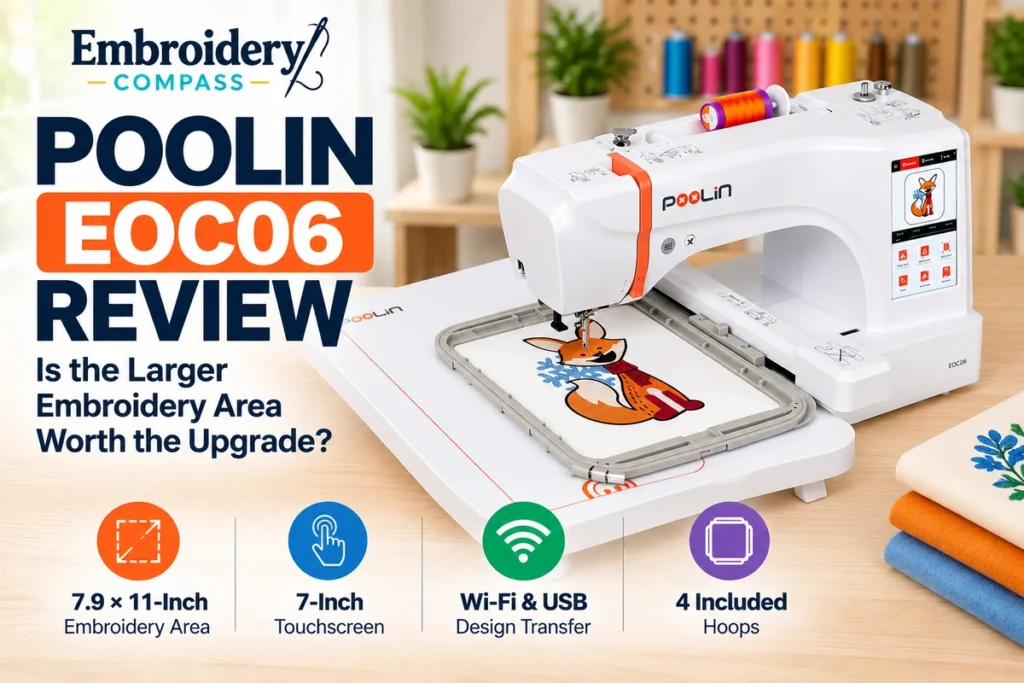
The POOLIN EOC06 is a single-needle embroidery machine designed for home users who want more room for larger designs without moving to a commercial multi-needle setup. Its standout feature is a 7.9 × 11-inch maximum embroidery area, supported by a 7-inch touchscreen, Wi-Fi and USB design transfer, and four included embroidery hoops.
But is the larger embroidery area worth the investment? In this POOLIN EOC06 review, we examine its specifications, practical advantages, learning curve, limitations, and long-term ownership considerations to help you decide whether it fits your projects.
POOLIN EOC06 Review: Quick Verdict
Our verdict: The POOLIN EOC06 is worth considering if you want to embroider larger designs on clothing, tote bags, home décor, and personalized gifts. Its 7.9 × 11-inch embroidery field, multiple included hoops, and design-transfer options provide flexibility that smaller embroidery machines cannot match.
Its biggest limitation is that it remains a single-needle, embroidery-only machine. You must change thread colors manually, and it cannot perform ordinary sewing tasks. Buyers should also evaluate available training, technical support, warranty terms, and local servicing before committing.
- Best for: Home embroiderers who want larger designs, personalized apparel, decorative projects, and room to develop their skills.
- Less suitable for: Buyers needing a combined sewing-and-embroidery machine or high-volume, multi-color commercial production.
- Biggest advantage: A generous embroidery area with four included hoops.
- Biggest trade-off: Single-needle operation and the need to understand embroidery file formats and design preparation.

POOLIN EOC06 Specifications
| Feature | POOLIN EOC06 |
| Machine type | Single-needle embroidery-only machine |
| Maximum embroidery area | 7.9 × 11 inches (200 × 280 mm) |
| Included embroidery hoops | Two 5.5 × 5.5-inch, one 7.9 × 7.9-inch, and one 7.9 × 11-inch hoop |
| Maximum embroidery speed | 860 stitches per minute |
| Touchscreen | 7-inch color touchscreen |
| Built-in embroidery patterns | 200 patterns |
| Built-in lettering fonts | 8 |
| Decorative borders | 26 |
| Design transfer | Wi-Fi and USB |
| Supported embroidery formats | DST and DSB |
| Operating system | InStitch OS3 |
| Threading | Semi-automatic needle-threading assistance |
| Other convenience features | Thread trimming, bobbin winding, thread-break alert |
| Machine weight | Approximately 29.8 lb (13.5 kg) |
| Regular sewing capability | No |
Specifications are based on POOLIN manufacturer documentation. Included accessories, software, and support arrangements may vary by retailer or bundle.
Why the 7.9 × 11-Inch Embroidery Area Matters
The EOC06’s most important feature is its 200 × 280 mm embroidery field. That gives you room to stitch designs that would not fit within the embroidery limits of smaller machines.
A larger embroidery area does not automatically produce better stitches. Its main advantage is flexibility: you can arrange larger artwork, lettering, or multiple design elements within one embroidery field, provided the finished design fits the hoop and the garment can be positioned correctly.
Projects That Benefit From the Larger Hoop
- Jacket backs: Larger decorative designs and personalized artwork.
- Tote bags: Names, floral arrangements, and custom graphics.
- Hoodies and sweatshirts: Larger embroidery placements when the garment can be hooped securely.
- Home décor: Decorative cushion covers, table linens, and fabric panels.
- Personalized gifts: Monograms, names, and multi-element embroidery layouts.
- Quilting projects: Decorative blocks and embroidery motifs that fit within the available field.
For example, a design measuring 7 × 10 inches can fit within the EOC06’s maximum stated embroidery field, assuming its orientation, stitch file, fabric placement, and hoop clearance are suitable. The same design would exceed the maximum embroidery area of a typical 5 × 7-inch machine.
However, the usable embroidery area is not the same as the outer dimensions of the hoop. Always confirm the actual design dimensions before purchasing or transferring an embroidery file.
Four Included Hoops: More Flexibility for Different Projects
POOLIN includes four hoops in three sizes with the EOC06:
- Two 5.5 × 5.5-inch hoops (140 × 140 mm)
- One 7.9 × 7.9-inch hoop (200 × 200 mm)
- One 7.9 × 11-inch hoop (200 × 280 mm)
This selection is useful because you do not need the largest hoop for every design. A smaller hoop can be more practical for a compact monogram, patch, or decorative motif, while the larger hoop provides space for more ambitious layouts.
The second 5.5-inch hoop may also help organize projects when preparing several similar items, although you will still stitch them one at a time.
Practical buying tip: Before choosing the EOC06, consider the size of the designs you expect to make most often. If your work will mainly consist of small names and logos, the maximum embroidery area may be more capacity than you need. If you regularly plan large apparel or décor designs, it becomes a more meaningful advantage.
7-Inch Touchscreen and Ease of Use
The EOC06 features a 7-inch color touchscreen that provides access to built-in designs, embroidery settings, lettering, and design placement controls.
According to POOLIN, the interface supports operations such as rotating, flipping, resizing, and positioning designs. These controls can reduce the need to return to a computer for every simple layout adjustment.
Is the POOLIN EOC06 Beginner-Friendly?
The EOC06 offers several features that can help beginners, including an on-machine design library, a large screen, threading assistance, and guided design selection. However, learning embroidery involves more than learning the controls.
New users will still need to understand:
- How to choose stabilizer for different fabrics.
- How to hoop material without stretching or distorting it.
- How to match needles and thread to the project.
- How to position designs and confirm the stitch area.
- How to change thread colors during a multi-color design.
- How to prepare and transfer compatible embroidery files.
These skills are normal parts of machine embroidery. The EOC06’s touchscreen may make navigation more approachable, but it does not eliminate the learning curve.
If you are buying your first machine, our guide to the best embroidery machines for beginners explains the features worth prioritizing before purchase.
Embroidery Speed: Is 860 Stitches per Minute Fast Enough?
POOLIN specifies a maximum embroidery speed of 860 stitches per minute (SPM) for the EOC06. This is a useful capability for a home embroidery machine, but maximum speed should not be confused with the actual time needed to finish a project.
Real production time depends on design density, stitch count, fabric, stabilizer, thread changes, and the speed settings used during embroidery.
For instance, a design containing 20,000 stitches would have a theoretical stitching time of approximately 23 minutes at a continuous 860 SPM. That calculation excludes color changes, trimming, machine movement, setup, and any speed reductions. Actual completion time may be considerably longer.
The Single-Needle Limitation
The EOC06 uses one needle, so different thread colors generally require the operator to change the thread between color sections. Automatic thread trimming helps with the process, but it does not make the machine a multi-needle embroidery system.
For occasional gifts, home projects, and limited personalized orders, manual color changes may be manageable. For repeated multi-color logos or large production batches, the interruptions become a more important consideration.
Buyers planning a commercial embroidery operation should also read our best embroidery machines for small business guide to understand the difference between home embroidery and production-oriented equipment.
Built-In Designs, Lettering Fonts, and Editing
The POOLIN EOC06 includes 200 built-in embroidery patterns, eight lettering fonts, and 26 decorative borders, according to the manufacturer’s published specifications.
Built-in designs are helpful when you want to practice embroidery without immediately purchasing additional design files. Lettering fonts are particularly useful for names, initials, monograms, and simple personalized gifts.
The machine also offers on-screen editing functions for arranging and adjusting supported designs. This makes basic customization possible without creating every project from scratch.
Can You Embroider Your Own Logos?
Yes, provided your artwork is prepared as a compatible embroidery design. An ordinary JPG, PNG, or vector logo is not automatically a stitch-ready embroidery file.
Digitizing software must convert the artwork into embroidery instructions, including stitch types, stitch directions, and other machine-readable information. POOLIN promotes its InStitch software for creating and transferring designs, but you should confirm the current software features and access terms before relying on a particular workflow.
This distinction is especially important for buyers who plan to embroider business logos or detailed custom artwork.
Wi-Fi, USB, and Embroidery File Compatibility
The EOC06 supports both Wi-Fi and USB design transfer. These options allow you to move compatible embroidery files from a design workflow to the machine without relying entirely on built-in patterns.
POOLIN identifies DST and DSB as supported embroidery file formats. Designs in other formats may need conversion before they can be used.
This matters if you already own an embroidery design collection or intend to buy designs from online marketplaces. Before purchasing files, check the available formats and whether your software can convert them correctly.
Important: Do not assume that a PES, EXP, JEF, or other embroidery file will work directly on the EOC06. Confirm compatibility or convert the design to a supported format first.
Automatic Features and Everyday Convenience
The EOC06 includes several features intended to reduce repetitive setup tasks:
- Needle-threading assistance: Helps with threading the needle, although some manual steps remain.
- Thread trimming: Cuts thread during supported embroidery operations.
- Bobbin winding: Provides a convenient way to prepare bobbins.
- Thread-break alert: Notifies the operator when the machine detects an upper-thread break.
- Touchscreen controls: Allow design selection, placement, and supported editing operations.
These features are useful, but they do not replace correct machine setup. Thread tension, needle condition, stabilizer choice, and proper hooping remain essential for consistent embroidery results.
What’s Included With the POOLIN EOC06?
POOLIN’s published standard-package information includes the embroidery machine, four hoops, an embroidery extension table, needles, bobbins, starter thread, stabilizer sheets, a USB drive, and several maintenance and setup accessories.
Some listed accessories include scissors, tweezers, a seam ripper with brush, hoop clips, tools, a thread stand, and an instruction manual. The manufacturer also lists additional replacement and setup components.
That starter selection can be helpful because beginners often need several supplies before completing their first project. Nevertheless, consumables such as embroidery thread, bobbins, stabilizers, and needles will require replenishment.
Before ordering: Compare the exact contents of your Amazon listing with the manufacturer’s standard package. Retailer bundles can differ, and an accessory advertised on one listing may not be included with another.
Can the POOLIN EOC06 Be Used for a Small Embroidery Business?
The EOC06 has features that may appeal to someone beginning a small embroidery side business, particularly its large embroidery field, lettering options, and ability to import custom designs.
Potential applications include personalized gifts, custom tote bags, decorative apparel, and limited batches of embroidered products.
However, the machine’s suitability depends on your expected order volume and production requirements. It is still a home-oriented, single-needle embroidery machine rather than a commercial multi-needle system.
Before using it for paid orders, consider the time required for hooping, thread changes, sample stitching, machine maintenance, and correcting embroidery mistakes. Also investigate warranty conditions and whether your intended business usage is covered.
Our assessment: The EOC06 is a plausible option for learning, prototyping, and smaller personalized orders, but it should not be treated as equivalent to a dedicated multi-needle production machine.
Maintenance, Warranty, and Long-Term Ownership
A machine’s features are only part of the buying decision. Long-term ownership also depends on cleaning, replacement parts, technical support, and the availability of servicing.
POOLIN publishes setup guidance and support information, but buyers should confirm the support arrangements that apply to their country and retailer before purchasing.
Questions to Ask Before Buying
- Who handles warranty claims for the Amazon listing?
- Is repair service available locally, or would the machine need to be shipped?
- How are replacement hoops, bobbin components, and other parts obtained?
- What setup tutorials and technical assistance are available?
- What software features are included, and are any services subscription-based?
- What is the retailer’s return policy if the machine does not meet your needs?
These questions are especially important for buyers who expect to use the machine regularly or depend on it for customer orders.
POOLIN EOC06 Pros and Cons
Pros
- Large 7.9 × 11-inch embroidery area
- Four included hoops in three sizes
- 7-inch touchscreen
- 200 built-in embroidery patterns
- Eight lettering fonts
- Wi-Fi and USB design transfer
- Maximum speed of 860 SPM
- Starter accessories included
- Thread trimming and thread-break alert
Cons
- No regular sewing function
- Manual thread changes between colors
- DST/DSB format requirements may involve conversion
- Custom artwork still requires proper digitizing
- Larger projects require careful hooping and stabilization
- Support and servicing arrangements need checking
- May be more machine than occasional small-design users need
Who Should Buy the POOLIN EOC06?
The EOC06 makes the most sense for buyers who already know they want a generous embroidery field and expect to use that capacity regularly.
- Ambitious home embroiderers: People planning larger artwork and more varied projects.
- Personalized-gift creators: Users making names, monograms, decorative designs, and custom fabric gifts.
- Apparel decorators: Buyers interested in larger placements on suitable jackets, sweatshirts, and bags.
- Developing embroidery hobbyists: Users who want more room to grow without immediately moving to multi-needle equipment.
- Small-scale sellers: Creators testing personalized products or fulfilling occasional orders.
Who Should Skip It?
Consider another type of machine if you need:
- Regular sewing and embroidery in one machine: The EOC06 does not sew conventional seams or buttonholes.
- Only small embroidery designs: A smaller machine may be more appropriate if you rarely need a large hoop.
- Frequent multi-color production: A multi-needle machine can reduce manual thread changes.
- A specific native file format: Check your design workflow before assuming direct compatibility.
- Guaranteed nearby servicing: Confirm local support before purchasing if this is essential.
POOLIN EOC06 Alternatives Worth Considering
POOLIN EOC05
If your projects are smaller or you want a machine that also handles regular sewing, the newer EOC05 2-in-1 version may be worth considering. Our POOLIN EOC05 review examines its beginner-oriented features and limitations.
Brother PE900
The Brother PE900 is another home embroidery option, with a smaller 5 × 7-inch embroidery field and a different design ecosystem. It may suit buyers who prioritize that machine’s features over a larger embroidery area.
For a broader selection, explore our best embroidery machines buying guide.
POOLIN EOC06 Frequently Asked Questions
Is the POOLIN EOC06 good for beginners?
It can be a suitable first embroidery machine for a beginner who wants a large embroidery area and is prepared to learn hooping, stabilizer selection, thread changes, and embroidery file preparation. Its touchscreen and built-in patterns may help with the initial learning process.
What is the maximum embroidery area of the POOLIN EOC06?
The maximum embroidery area is 7.9 × 11 inches, approximately 200 × 280 mm.
Can the POOLIN EOC06 sew regular stitches?
No. The EOC06 is an embroidery-only machine and does not replace a regular sewing machine.
How many hoops come with the POOLIN EOC06?
POOLIN lists four included hoops: two 5.5 × 5.5-inch hoops, one 7.9 × 7.9-inch hoop, and one 7.9 × 11-inch hoop. Confirm the package contents for your chosen retailer.
What embroidery file formats does the EOC06 support?
The manufacturer lists DST and DSB as supported formats. Other formats may need conversion before transfer.
Does the POOLIN EOC06 support Wi-Fi?
Yes. The machine supports Wi-Fi and USB design transfer for compatible embroidery files.
Does the EOC06 automatically change thread colors?
No. It is a single-needle embroidery machine, so thread colors must generally be changed manually between color sections.
Can I use the EOC06 for a home embroidery business?
It may be useful for learning, product samples, personalized gifts, and limited orders. For regular high-volume work, consider how manual thread changes, hooping time, servicing, and machine downtime would affect your production needs.
Is the larger embroidery area worth paying for?
It is more valuable if you regularly create designs that exceed smaller embroidery fields. If you mostly embroider compact logos, names, or patches, a smaller machine may meet your needs without paying for unused capacity.
Final Verdict: Is the POOLIN EOC06 Worth It?
The POOLIN EOC06 offers a useful combination of large embroidery capacity, multiple hoops, touchscreen controls, and wireless design transfer. Its 7.9 × 11-inch embroidery area is the clearest reason to consider it, particularly for home creators who want to move beyond smaller embroidery projects.
However, buying a larger embroidery machine is not automatically the best decision for everyone. The EOC06 is still a single-needle, embroidery-only system, and custom projects require preparation, suitable files, and proper embroidery technique.
Our recommendation: Shortlist the EOC06 if your planned projects genuinely benefit from its larger embroidery field and you are comfortable learning the associated workflow. Before ordering, verify the exact Amazon bundle, warranty coverage, software requirements, and support arrangements.
How We Researched This Review
Embroidery Compass develops its recommendations through manufacturer documentation, specifications, feature comparisons, and practical buying research. We do not claim hands-on testing unless a machine has actually been personally tested.
For this POOLIN EOC06 review, we evaluated the manufacturer’s published specifications, embroidery area, hoop selection, design-transfer options, included accessories, and practical limitations of single-needle embroidery. We also considered the questions buyers should investigate regarding servicing, software compatibility, and long-term ownership.
Manufacturer references: POOLIN EOC06 official product page and POOLIN Europe EOC06 specifications and features.